Working with the LogiTech MK700 mouse without drivers for Mac OS X
I have long been searching for a proper driver for my LogiTech MK700 wireless mouse and keyboard set. It turns out there is none. The official LogiTech Control Center application does not really work: after installing, neither my keyboard nor my mouse were recognized for further customization. The only possible configuration is in the Mission Control of the System Configuration, where only four of the mouse buttons can be used for pre-defined actions.
To solve this issue, I decided to give some helper applications on the market a
shot, including USBOverDrive and SteerMouse. Initially they won’t
detect my mouse (otherwise I probably won’t post this at all). After some
experimentation I figured out the reason. To cut the story short, the key point
is to remove the driver that comes with the LogiTech Control Center application
by using the uninstaller (located at /Applications/Utilities/LCC
Uninstaller.app) so that the 3rd party drivers will work. Now SteerMouse
works fine for me. It will very likely be my next purchase after the trial
period.
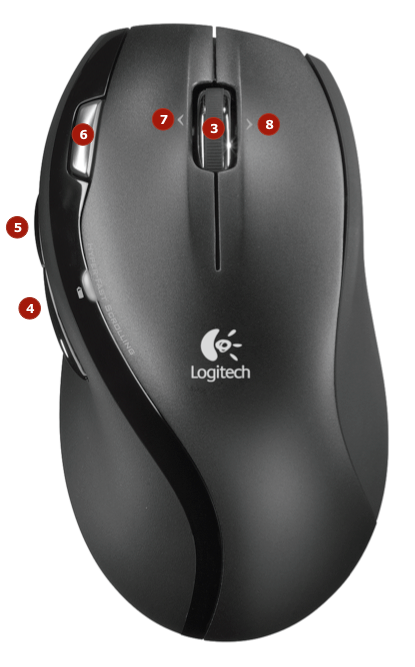
To celebrate, I drew a diagram showing the button mappings.